From Tools to Framework: What a Year of Agentic Development Actually Looks Like
Frameworks are inevitable.
Kevin Kelly wrote about this in What Technology Wants — that certain inventions appear independently, in multiple places, at roughly the same time. The telephone, the lightbulb, calculus. Not because of genius, but because the conditions were right. The substrate was ready and the solution was waiting to be found.
Ruby got Rails. Python got Django. PHP got Laravel. In each case, the same pattern: developers working with raw tools hit a ceiling, and someone assembled an opinionated structure that encoded what worked into something repeatable. The framework didn’t invent new capabilities — it organized the ones that already existed into a form that could be taught, shared, and built upon.
The same thing is happening now with AI-assisted development.
The Chaos Phase
A year ago, I was handed AI and told to figure it out. That’s not quite right — nobody handed me anything. I was a one-person engineering team managing a Rails web application, an iOS app, a macOS desktop app, and a portfolio of side projects. I needed help, and the tools existed, so I started using them.
The first few months were raw improvisation. I’d open Claude Code, describe what I wanted, review the output, and iterate. It worked, but it was scattered. Every session started from zero. Context lived in my head. Quality depended on how carefully I reviewed. There was no system — just a developer and a very capable autocomplete.
This is where most people are right now. They have access to AI, and they’re getting value from it, but they’re rebuilding the scaffolding every time they sit down. It’s the equivalent of writing a Node.js web application in 2012 — before Express, before any framework existed. You can build anything, but you’re building everything from scratch.
The Emergence Phase
Tools started to accrete. A /morning command because I was tired of opening four browser tabs. A /ticket command because I kept writing the same Gherkin acceptance criteria structure by hand. Memory files because I kept re-explaining the same architectural decisions to a model that couldn’t remember yesterday.
I wrote about this in The System That Built Itself — a system that grew organically from daily necessity. Six custom commands. 802 lines of project instructions. Ten active project directories with persistent memory. None of it planned. All of it necessary.
But something was missing. I had tools, but I couldn’t explain how they fit together. When people asked “what’s your workflow?” I’d stumble through a description of individual pieces without conveying the whole. I had a toolbox. I didn’t have a framework.
The Framework Phase
The distinction matters. A toolbox is a collection of things that might be useful. A framework is an opinionated structure where everything has a place, a purpose, and a relationship to everything else. Rails isn’t just a collection of Ruby gems — it’s a set of conventions that tell you where your models go, how your routes work, and what happens when a request comes in. The value isn’t in any individual piece. It’s in the opinions about how the pieces connect.
I recently watched a demo of BMAD — the Breakthrough Method for Agile AI Driven Development. It’s an open-source framework that packages the entire software development lifecycle into a set of AI personas, workflows, and planning artifacts. It has 12+ specialized agent roles, structured planning stages, and a “Party Mode” where multiple personas collaborate within a single conversation.
What struck me wasn’t the framework itself — it was the recognition. BMAD had arrived at many of the same structures I’d built independently. Specialized personas with defined cognitive modes. Structured planning workflows. Quality gates. Reflection and iteration loops. Two systems, built in isolation, converging on the same architecture.
That convergence is the signal. It means these patterns aren’t arbitrary preferences — they’re what the work demands.
The Framework I Built
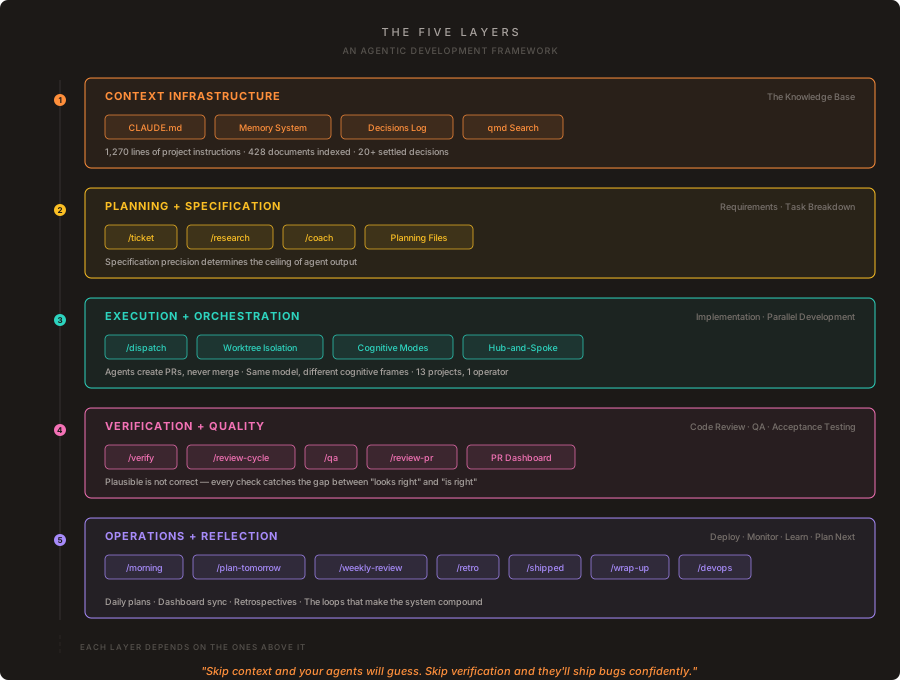
What follows is a complete inventory of every piece in my agentic development system, organized into five layers. Each layer maps to a phase of the software development lifecycle. Each piece has a specific purpose and a specific moment when it’s most valuable.
This isn’t theoretical. Every piece has been used in production across 13 projects over the past year. Some pieces have been rewritten three times. Some have been retired. What’s listed here is what survived.
Layer 1: Context Infrastructure
The knowledge base. SDLC phase: Environment Setup and Institutional Knowledge.
This layer exists to solve the fundamental problem of agentic development: agents start every session knowing nothing. The context that lives in your head — conventions, decisions, constraints, history — has to be externalized into a form that agents can read, search, and act on.
| Piece | What It Is | What It Does | When to Use It |
|---|---|---|---|
| CLAUDE.md | Per-project constitutions (1,270 lines across 3 repos) | Encodes tech stack, conventions, quality standards, and design system. Every agent reads these first. | Automatically loaded on session start. Update when conventions change or a new pattern becomes standard. |
| Memory System | Persistent cross-session knowledge files | Stores user profile, project context, and reference pointers that survive between conversations. | Automatically loaded each session. Write to it when you learn something future sessions need — a preference, a project fact, a settled question. |
| Decisions Log | Settled architectural and strategic decisions with rationale | Prevents agents from re-litigating resolved questions. Each entry includes what was decided, why, and what alternatives were rejected. | Check before proposing any architectural change. Write to it after any retrospective, review, or conversation that settles a question definitively. |
| qmd Search | On-device semantic search engine (428 docs, 7 collections) | Agents search across all project documentation without cloud dependency. BM25 + vector + re-ranking. | When an agent needs to find prior art, a related decision, or documentation that exists somewhere in the portfolio but you don’t know where. |
BMAD parallel: project context files and knowledge base setup.
Layer 2: Planning and Specification
The thinking phase. SDLC phase: Requirements, Specification, and Task Breakdown.
This layer converts loose ideas into precise specifications. The quality of everything downstream — agent output, code review, acceptance testing — depends on the precision of what’s specified here. I wrote about this in more depth in Specification Precision .
| Piece | What It Is | What It Does | When to Use It |
|---|---|---|---|
| /ticket | Conversational-to-specification transformer | Turns a loose idea into a planning file with Gherkin acceptance criteria, test plans, and quality checklists. | When you have a feature idea or bug report and need to convert it into something an agent can implement without ambiguity. Before any non-trivial implementation begins. |
| /research | Investigative synthesis skill | Searches internal docs and external sources, presents options with trade-offs, separates “what we know” from “what’s new.” | When facing a build-vs-buy decision, evaluating a new technology, or needing to understand a domain before committing to an approach. |
| /coach | Strategic thought partner | Processes external content through my specific lens — career history, portfolio, core convictions. Challenges rather than flatters. | When consuming external content and wanting to extract what’s specifically relevant to your situation. When weighing a strategic decision. |
| Planning Files | Markdown with YAML frontmatter | Source of truth for all project planning — status, priority, linked PRs. Co-located with code, editable by agents. | Created by /ticket. Updated continuously as work progresses — status moves from Backlog to In Progress to QA Needed to Done. |
BMAD parallel: Project Manager and Analyst personas, epic and story creation workflows.
Layer 3: Execution and Orchestration
The building phase. SDLC phase: Implementation and Parallel Development.
This is where code gets written. The key insight: the value isn’t in telling an agent what to code. It’s in structuring the execution environment so that multiple agents can work simultaneously without stepping on each other or drifting from the specification.
| Piece | What It Is | What It Does | When to Use It |
|---|---|---|---|
| /dispatch | Agentic virtual office | Breaks work into independent tasks, assigns to parallel agents in isolated worktrees. Agents create PRs but never merge. | When you have 2+ independent tasks across projects and want to step away while agents work. Best for well-specified tasks with clear acceptance criteria. |
| Worktree Isolation | Git worktree per agent | Each agent gets its own copy of the repository. Prevents agents from conflicting with each other or with your working tree. | Automatically used by /dispatch. Also use manually when you want an agent to work on a branch without disturbing your current checkout. |
| Cognitive Modes | Persona definitions on every skill | Each skill declares its thinking mode — Executive, Staff Engineer, QA Lead, Operations Manager. Same model, different cognitive frame. | Automatically applied when any skill runs. When creating a new skill, the cognitive mode preamble is the single highest-leverage line in the file. |
| Hub-and-Spoke Architecture | Command center plus independent project repos | Each project is autonomous with its own CLAUDE.md and planning files. The command center provides the cross-project view. | The structural foundation. Work in a project repo for implementation. Work in the command center for portfolio-level operations. |
BMAD parallel: Developer persona, “Party Mode” multi-agent sessions, specialized agent roles.
Layer 4: Verification and Quality
The checking phase. SDLC phase: Code Review, QA, and Acceptance Testing.
This layer exists because agents produce plausible output. Plausible is not the same as correct. Every piece here is designed to catch the gap between “looks right” and “is right” before it reaches production.
| Piece | What It Is | What It Does | When to Use It |
|---|---|---|---|
| /verify | Unified quality gate | Runs all checks in one pass — linters, tests, acceptance criteria cross-reference against Gherkin specs from the original ticket. | Before marking any feature branch as ready for review. The last step before opening or updating a PR. |
| /review-cycle | Autonomous PR review processor | Fetches unresolved bot review comments, classifies by severity (T1 must-fix through T4 dismiss), auto-fixes real issues, resolves noise, tracks reviewer effectiveness over time. | After CI and bot reviewers have posted comments on a PR. Run iteratively — each cycle processes new comments until diminishing returns are detected. |
| /qa | Visual QA via browser | Catches what automated tests miss — layout regressions, broken UI, design system violations. Tests the running application, not the code. | After a feature is functionally complete but before shipping. Especially critical for frontend changes, new pages, or design system updates. |
| /review-pr | Code review skill | Reviews diffs against the target branch with security analysis and comprehensive feedback. | When you want a second opinion on a branch before merging, or when reviewing an agent-generated PR. |
| Review Dashboard | Cumulative tracking across all PRs | Bot effectiveness metrics, issue category analysis, recurrence pattern detection. Answers: which bots are actually useful? | Auto-updated by /review-cycle. Reference during retrospectives to identify systemic quality patterns. |
BMAD parallel: QA persona, review workflows, quality gates.
Layer 5: Operations and Reflection
The running phase. SDLC phase: Deploy, Monitor, Learn, and Plan Next.
This is the layer that makes the whole system compound. Without reflection, you repeat mistakes. Without planning, you start each day figuring out what to do instead of doing it. This layer turns a collection of sessions into an ongoing practice.
| Piece | What It Is | What It Does | When to Use It |
|---|---|---|---|
| /morning | Executive briefing | Syncs all projects, shows what’s in flight, what’s blocked, and where attention has highest leverage today. | First thing every workday. Coffee in hand, terminal open. Read-only — no decisions, just awareness. |
| /plan-tomorrow | Chief of Staff planning | Three-phase workflow: review today, ask questions, generate a prioritized plan from live project data. | End of each workday. Sets up tomorrow so you can start with /morning and immediately execute. |
| /weekly-review | VP of Engineering portfolio review | Cross-division status, priorities for the week, blockers, resource allocation decisions. | Monday mornings. Forward-looking — what needs to happen this week and where should attention go. |
| /retro | Engineering manager retrospective | Gathers git activity across all repos, analyzes wins and pain points, generates lessons and process changes. | Friday afternoons. Backward-looking — what shipped, what stuck, what to carry forward as institutional knowledge. |
| /shipped | Ops clerk for closure | Marks PRs as Done, updates planning files, cleans up branches and worktrees, syncs the dashboard. | Immediately after merging PRs. Keeps the board clean and the dashboard honest. |
| /wrap-up | Session documentation | Captures the full story of what was built — problem, approach, solution, analogy, and open items for next time. | End of any significant work session — especially debugging sessions or complex features where the “why” matters as much as the “what.” |
| /devops | Infrastructure health check | Production monitoring across the hosting stack — database, cache, background jobs, application metrics. | Before and after deploys. Weekly as part of operational hygiene. On-demand when something feels off in production. |
| Daily Plans | Dated markdown files | The working document for each day — rolled-forward items, priorities, schedule, and links to reference docs. | Generated by /plan-tomorrow, referenced by /morning. The contract between evening-you and morning-you. |
| Dashboard Sync | Python scripts plus Hugo site | Reads planning files across all repos, generates YAML data, rebuilds a visual dashboard behind authentication. | Automatically triggered by /morning, /plan-tomorrow, /weekly-review, and /shipped. The glue that keeps the portfolio view current. |
BMAD parallel: retrospective and iteration workflows.
The Cadence
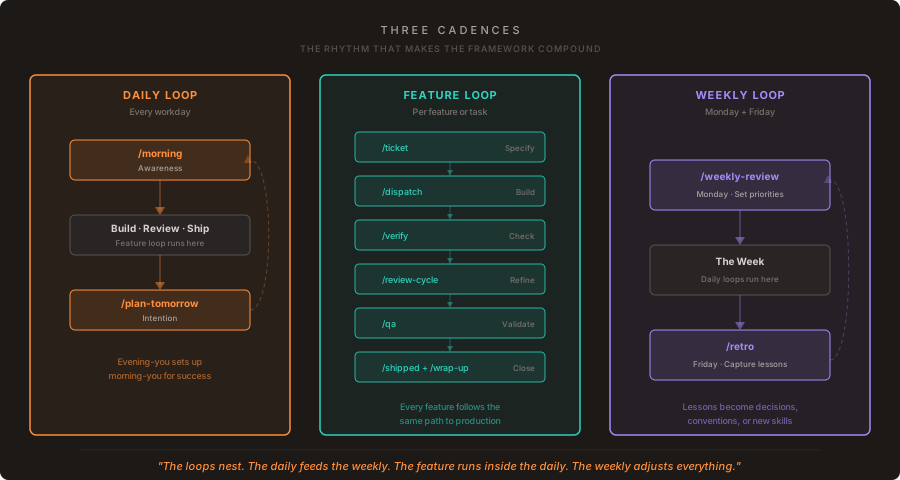
The framework isn’t just the pieces — it’s the rhythm. Three loops run at different frequencies:
The daily loop. /morning starts the day with awareness. Work happens. /plan-tomorrow closes the day with intention. This loop ensures that no day starts with the question “what should I work on?” and no day ends without setting up the next one.
The feature loop. /ticket defines the work. /dispatch sends agents to build it. /verify checks it against the specification. /review-cycle processes reviewer feedback. /qa tests it visually. /shipped closes it out. /wrap-up documents what happened. This loop ensures that every feature follows the same path from idea to production, regardless of which project it’s in.
The weekly loop. /weekly-review on Monday sets the priorities. /retro on Friday captures the lessons. This loop ensures that the framework itself evolves — every retro can produce a new settled decision, a new convention in CLAUDE.md, or a new skill to address a recurring pain point.
The loops nest. The daily loop feeds the weekly loop. The feature loop runs inside the daily loop. The weekly loop adjusts the daily loop. It’s the same pattern you’d see in any well-run engineering organization — standups, sprint cycles, retrospectives — except the team is one person and the processes are encoded as executable skills.
BMAD and the Ecosystem
I want to be clear about something: if I were starting today, I might start with BMAD . It’s a well-thought-out framework that solves the exact problem I solved through a year of trial and error. It has 12+ domain expert personas, structured planning workflows, scale-adaptive intelligence that adjusts planning depth based on project complexity, and a community iterating on it.
My framework wasn’t built in the absence of alternatives — it was built in the absence of alternatives at the time. When I started, there were no agentic development frameworks. There were tools, and there were models, and there was a lot of figuring it out as you went.
The fact that BMAD and my system converged on similar structures — personas, planning artifacts, quality gates, reflection loops — tells you something important. These patterns aren’t one person’s preference. They’re what the work demands. Just as Rails and Django independently arrived at MVC, model-view-controller architecture, agentic development frameworks are independently arriving at: context management, specification workflows, execution isolation, quality verification, and operational cadence.
There will be many frameworks. BMAD is one. Mine is another. The specific tools and conventions will vary. The structural patterns won’t, because the structural patterns are dictated by the nature of the work itself.
The Numbers
For those who want the concrete picture:
- 16 custom skills — 11 global, 5 project-specific
- 1,270 lines of CLAUDE.md project instructions across 3 major repos
- 428 documents indexed for on-device semantic search
- 13 active projects orchestrated from a single operator
- 20+ settled decisions documented with rationale and rejected alternatives
- 3 operational cadences — daily, feature, and weekly loops
These numbers are a snapshot. A year ago, every one of them was zero.
What I’d Tell You
If you’re in the chaos phase — using AI tools but without a system — here’s what I’d suggest:
Start with context. Write a CLAUDE.md for your project. Put your conventions, your tech stack, your quality expectations in one place. This single file will do more for your agent output quality than any prompt engineering technique.
Then add specification. Build a way to turn ideas into precise instructions. Gherkin acceptance criteria, structured planning files, whatever format works for you. The precision of your specification determines the ceiling of your agent’s output.
Then add verification. Don’t trust plausible output. Build quality gates that catch the gap between “looks right” and “is right.” Automate what you can. Review what you can’t.
Then add reflection. Retrospectives, wrap-ups, decision logs. The framework should evolve based on what you learn, not stay frozen at the point where you built it.
Then add orchestration. Parallel agents, worktree isolation, dispatch systems. This is the last step, not the first, because orchestration without context, specification, and verification just produces more wrong code faster.
The order matters. Each layer depends on the ones below it. Skip context and your agents will guess. Skip specification and your agents will build the wrong thing precisely. Skip verification and your agents will ship bugs confidently. Skip reflection and you’ll make the same mistakes in new projects.
The Inevitable
Frameworks are inevitable because the problems they solve are universal. Every developer working with AI agents will eventually need context management, specification workflows, quality gates, and operational cadence. The question isn’t whether you’ll build a framework — it’s whether you’ll build one intentionally or discover one growing in your toolbox after the fact.
I did it the second way. You don’t have to.
This is the fourth in a series on AI-augmented engineering. Previously: The One-Person Engineering Team , Eliminating Waste in the SDLC , and The System That Built Itself .