Building an environmental monitor with the Adafruit Clue
A CircuitPython and Python environmental data logger on the Adafruit Clue. BLE ambitions, a USB Serial pivot, and a pywebview gateway with live charts. Originally posted on officeofadamthede.com.
This post was originally published on officeofadamthede.com on April 8, 2025. I’m consolidating it here because the data this Clue has been logging ever since became the dataset behind a bake-off post a year later. Capture solved here, synthesis explored there.
I had an Adafruit Clue on the desk, a board packed with sensors for temperature, humidity, pressure, and light. I wanted it to read the air in my office every few minutes and put the numbers somewhere I could use them. I was new to IoT hardware and close to new at Python. The AI tools did a lot of the work.
The idea
Capture a reading every few minutes, then get it off the device and into Adafruit IO for storage and charts. The plan was Bluetooth Low Energy, so the Clue could buffer locally when my computer wasn’t around to receive. Wireless seemed like the flexible choice.
CircuitPython, Python, and the AI
The Clue runs CircuitPython, a version of Python for microcontrollers. This was my first time programming hardware at this level. Standard Python was the obvious choice on the computer side for the gateway script. I leaned on the experimental Gemini 2.5 Pro model, running inside my editor, to get through the parts I didn’t know.
Roo-Code got me started. Its architect persona wrote the first detailed project plan, a PROJECT_PLAN.md, and I built from that.
The BLE challenge
BLE had opinions. A reliable connection with guaranteed delivery and buffering logic, between CircuitPython on the Clue and a Python script on my Mac talking through bleak, turned out to be much harder than it looked. Debugging wireless felt like chasing ghosts. The AI explained plenty and wrote plenty of snippets, and the BLE stack still fought us on connection stability. So we changed strategy.
The pivot to USB Serial
The Clue exposes a USB Serial connection when it’s plugged in. We used that instead. The Clue prints its readings as JSON to the Serial output, and the Python gateway on the Mac listens to the port.
That simplified three things at once:
- The CircuitPython on the Clue got much cleaner.
- The gateway script had a stable wired connection to read from.
- Debugging got much easier, because we could watch the data stream directly.
We lost wireless and we lost the onboard buffering, so the gateway has to be running to capture anything. We got reliability and speed back in exchange.
From console to window
The gateway started as a command-line script. We wrapped it in pywebview, which puts HTML, CSS, and JavaScript inside a native desktop window. The AI wrote most of the first HTML and CSS and JavaScript, wired up Chart.js, and handled the Python backend that moves data between the web UI and the serial port. That got me:
- Live sensor readings on screen.
- Chart.js graphs of the data over time.
- A button that changes the Clue’s capture interval by sending a command back over Serial.
Watching sensor data fill live graphs inside a native macOS window was the moment it felt real.
The things that broke
- Getting the gateway to identify the Clue’s Serial port correctly.
- Parsing the JSON reliably.
- The command system for changing the interval, which needed the Python gateway and the CircuitPython code to agree.
- Timing, and keeping the main loops in both scripts from blocking each other.
That meant temporary debug messages, reading output, and going around again. Having Gemini there to explain an error, suggest a fix, and refactor made each lap shorter.
What it does now
- The Clue reads its sensors on an interval I set.
- It sends the data over USB Serial to a Python application running on my Mac.
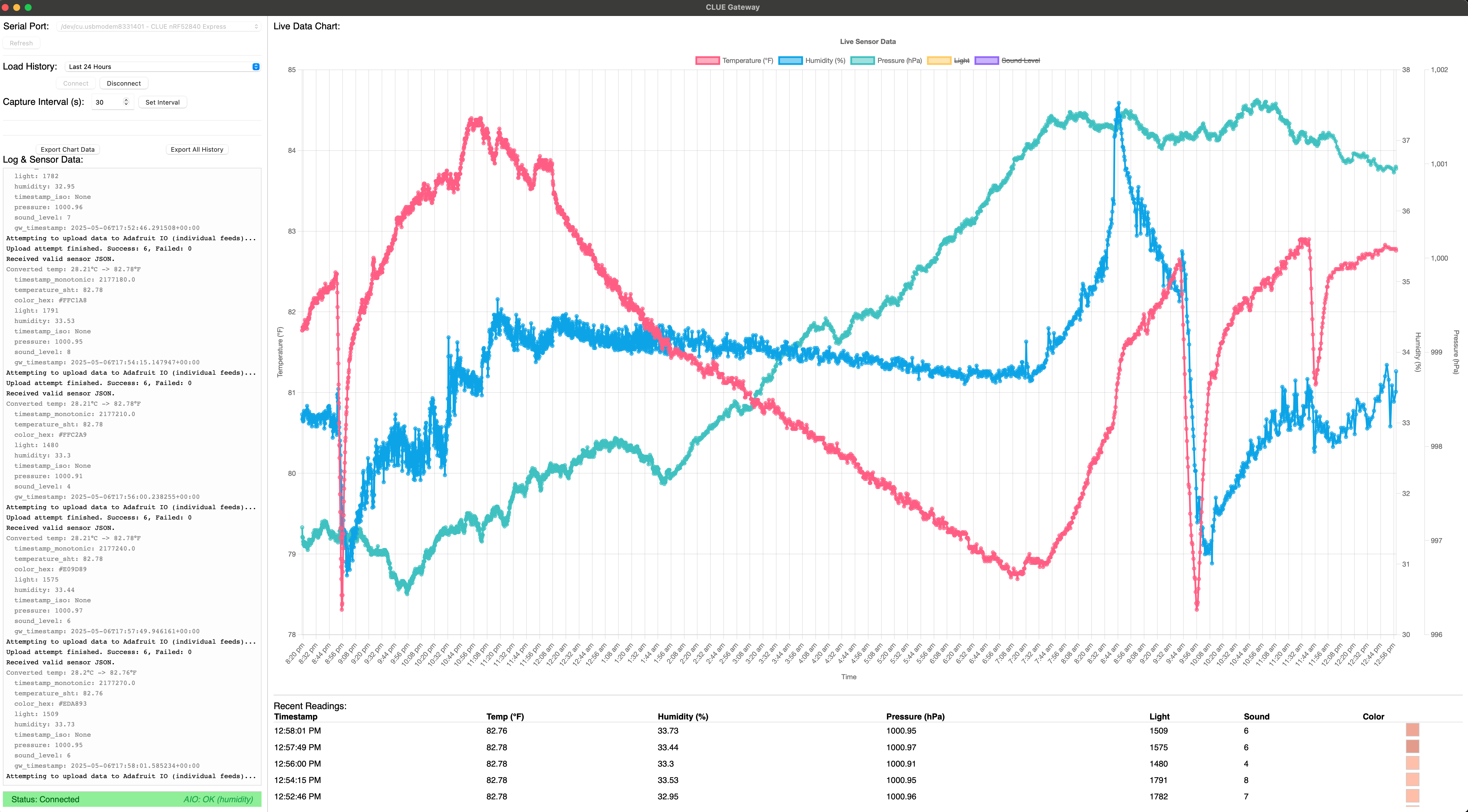
- The application displays it, plots it, logs it to a CSV, and uploads it to Adafruit IO.
What I got out of it
I went from scratch to a physical device sending data to an application I wrote, and I learned serial, json, threading, and pywebview on the way.
The AI is the reason it happened in the time it did. A newcomer to this stack, working alone, would have spent a long while on the parts that Gemini and Roo-Code handled in minutes. I got explanations when I was stuck, boilerplate when I needed it, and help untangling the interactions that were hard to see. What I spent my own time on was the logic and the learning.
We never got BLE working, and giving it up was the right call. The pywebview application is a better thing to use than the console script would have been.
If you’re curious about any of this, get a board like the Clue and start. Start simple, change the plan when the plan fights you, and use the AI assistants. You may be surprised at what you can build.
A year after this post went live, that same Clue is still on my desk, still logging every thirty seconds. I fed the resulting year of data to four frontier models and asked each one to build me a dashboard. Write-up here: Four frontier models, one year of office sensor data, four very different dashboards.